Free to play on iPhone, iPad and Mac

Zone it. Wire it.Watch it decideto grow.

Digicity is an isometric city builder. You get a 128×128 map and a clock that starts in 1900. Choose where to zone and how to connect it; buildings grow into different kinds as nearby streets, services, land value and other buildings shape the neighbourhood.

What is free, and what is not →
  • 14map overlays
  • 4historical eras
  • 0ads or accounts
Promotional illustration of a glowing stepped tower in a wooded Digicity neighbourhood beside the water.
Promotional artwork · gameplay screenshots below
How a city grows

You zone the land. The city does the building.

Residential, commercial and industrial demand responds to what you have already built, so every road and every plant changes what grows next.

  1. Zone

    Mark land residential, commercial or industrial, at light, medium or heavy density.

  2. Connect

    Drag out roads, power lines and water pipes. A lot without a road, power or water will struggle to grow.

  3. Wait for demand

    Buildings arrive when the city wants them and the land is worth building on. You set the conditions; the city decides.

  4. Find out why

    When a district stalls, lay an overlay over the map and see which of those conditions it is missing.

The land-value overlay in a Digicity city in 1925, shown in purple.
The purple shading on the map shows how land value varies across the city.
What you build

Every tool, free from the start.

In Open Build nothing is locked behind a timer, a level or a purchase. Roads, utilities and services are ready from the first tile, and 22 kinds of buildings can grow as the city develops. On iPhone, open a Build category before choosing a tool; after choosing, use Pan map before dragging the map so you do not place another tile. Hold a tool and choose What is this? to see what it places and what it needs to work.

  • Roads, trams and utilities

    Roads, tram lines, power lines and water pipes, each drawn by dragging.

  • Six ways to make power

    Two coal plants, hydro, wind, nuclear and a gas turbine, plus a district heat plant that lowers what a district draws.

  • Water

    Water pumps, water towers, and an artesian well that draws from under the city rather than from beside it.

  • Services

    Police stations, fire stations, treatment works that clean fouled water, and a reclamation yard that puts stained ground back.

  • Transit

    Bus and train terminals that extend how far your commute reaches.

  • Nine kinds of zone

    Residential, commercial and industrial, each at light, medium or heavy density.

A close-up of an individual building in Digicity’s 1925 city.

What the city does back

  • Demand. Residential, commercial and industrial demand that answers what you have built.
  • Pollution. Pollution that spreads from industry and drags land value down with it.
  • Land value. Land value that influences what grows where, and how far it gets.
  • Crime and fire. Crime and fire risk that your stations answer, and your neglect does not.
  • A monthly budget. Tax each kind of zone separately, and pay for what you built.
14 map overlays

Stop guessing why it stalled.

Lay any of 14 overlays over the map and find out why that district stopped growing: whether the power never reached it, the land lost its value to the smoke next door, or the lots are stranded in the middle of a deep block with no road.

  • Pollution
  • Traffic
  • Freight
  • Land value
  • Crime
  • Fire risk
  • Power coverage
  • Water coverage
  • Building age
  • Groundwater
  • Water pollution
  • Contamination
  • Elevation
  • Road access
Scenario mode

A city with a calendar.

Found a city around an anchor (a port, a university or a hospital) and play it forward through four eras. Report cards in 1930, 1970 and 2010 grade what you built. Take charge of eleven established challenge cities, choose transport priorities and emergency-service funding, and pursue seven optional ambitions. Everyone can preview the challenges; starting one requires Ultimate. Each offers two suggested approaches and an optional opening goal.

Explore all game types and city rules →
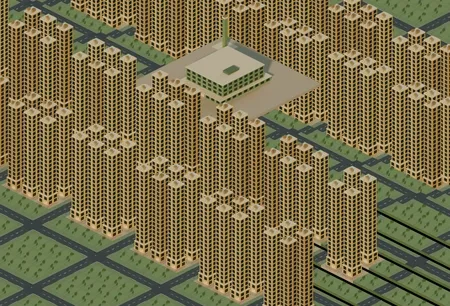
A dense Digicity district of towers grown around a university anchor.
  1. 1900–1929

    The Rail Era

    Scenario mode and its first thirty years: found a city, site its anchor, and grow it on foot and by streetcar.

  2. 1930–1969

    The Motor Era

    Cars stretch the city and then make its streets hard to live beside.

  3. 1970–2009

    The Service Era

    The ground remembers. Old industry stains the land it stood on, and the stain outlasts the bulldozer.

  4. 2010+

    The Logistics Era

    The city has to move goods, not just people. Power and water stop being limitless, and a district drawing more than its plants supply goes dark at its edges.

Every map is new

Reroll until the land is right.

Every city starts on a randomly generated map, and you can reroll until you find one worth building on. It tells you how much of it is water before you commit. In Open Build you can also start with a small town already standing: ten lots around a street, powered and watered, for you to extend.

The New City screen: a randomly generated map preview marked 6% water, with Reroll and Start buttons.
Time is yours

Three speeds, a pause, and an undo.

Run the clock at three speeds or stop it, with the space bar to toggle. One step of undo takes back the last thing you built and refunds what it cost, including whatever it flattened on the way in.

Space pause and resume

iPhone · iPad · Mac

One city builder, three screens.

One download from the App Store runs on all of them. VoiceOver labels and keyboard shortcuts are available throughout; there is no account, sign-in, game analytics or connection needed to play. Play in English, German, French, Italian, Spanish or Dutch. Other languages are translated from English using AI; translations may contain mistakes, and English is the original source.

  • iPhone

    iOS 26.0 or later

    Plays in landscape. The whole game, not a trimmed one: the same map, the same simulation, the same saves.

  • iPad

    iPadOS 26.0 or later

    Built around touch, with keyboard shortcuts throughout when a keyboard is attached.

  • Mac

    macOS 26.0 or later on a Mac with Apple M1 chip or later

    The iPad game on an Apple silicon Mac, with its keyboard shortcuts.

Your cities, on every device. With Saving, turn on Keep my cities in iCloud on each device, and your saved cities appear on every device signed in to the same Apple Account.

The price, plainly

Free to play. Nothing expires.

Open Build, the sandbox, is free and complete. Everything else is a one-time purchase. None of it is a subscription, and none of it expires.

  • Open Build

    Free

    The sandbox, complete. Every tool, every building, the whole map. No timers, no energy meters, no ads.

  • Saving

    $9.99

    Keep named saves and come back whenever. Device-local autosaves are on by default, with up to three recent recovery versions per city history.

  • Each Scenario era

    $1.99

    Scenario mode, sold one era at a time and played in order: The Rail Era opens it, and each later era extends the calendar once you own the ones before it.

    • The Rail Era 1900–1929
    • The Motor Era 1930–1969
    • The Service Era 1970–2009
    • The Logistics Era 2010+
  • Ultimate

    $19.99

    Saving and every era, present and future. Choose city rules before founding and start all eleven challenges. One purchase, yours through every update.

    What Ultimate includes →

The free game cannot save. Close Digicity, or let the system reclaim its memory while you are in another app, and the city is gone. Digicity tells you this before you build anything, so you can decide later.

US prices. The App Store shows the price in your country. Restore purchases from the game's menu (☰).

Download on theApp Store
New in 26.10.3

Rivers to cross, rules to choose.

Optional rivers with low and high bridges and local shipping, Standard, Relaxed and Custom city rules, river fires and earthquakes, two new disaster challenges with Ultimate, and a home screen for every game type.

  • Found a city on a river

    Choose optional Rivers when founding a city and see the banks in the map preview. New river banks taper into the surrounding hills. Existing cities keep their terrain.

  • Bridges and shipping

    Connect the banks with low or high road bridges. Low bridges carry roads across short gaps but block ships; high bridges leave a shipping channel beneath. Secondary terminals extend local port routes.

  • Choose the city rules

    Before founding a Scenario city, everyone can inspect eleven conditions. Standard is the default; Ultimate lets you choose Relaxed rules or a Custom set. The rules stay with the city after saving.

  • River fires and earthquakes

    Two optional disasters. Flames on the water cannot be extinguished and burn out on their own; fire crews protect the buildings beside them. Earthquakes can damage or destroy buildings, and an aftershock can follow.

  • Two cities to rebuild

    The River That Burned and Aftershock bring the challenges to eleven. Each offers two suggested recovery approaches and live goals. Everyone can preview them; starting one requires Ultimate.

  • A home for every game type

    First launch opens a home screen with Open Build, Scenario and Challenges, each with a short description. Optional links open the website’s game-type guide in your language.

Everything new in 26.10.3

Questions

Frequently asked

Is Digicity free?

Yes. Open Build, the sandbox, is free and complete: every tool, every building and the whole map, with no timers, no energy meters and no ads. Optional purchases are Saving ($9.99), each Scenario era ($1.99), and Ultimate ($19.99), which includes saving and every era, present and future. Everyone can preview eleven challenge cities, and Ultimate unlocks starting them, including for existing owners. None of the purchases is a subscription or expires. Prices are in US dollars; the App Store shows your local price.

Which devices does Digicity run on?

iPhone with iOS 26.0 or later, iPad with iPadOS 26.0 or later, and Mac with macOS 26.0 or later on an Apple M1 chip or later. It is one App Store download for all of them, and a purchase made on one can be restored on the others signed in to the same Apple Account.

Does Digicity run on an Intel Mac?

No. On Mac, Digicity needs Apple silicon: an M1 chip or later, running macOS 26.0 or later.

Can I play Digicity in portrait on iPhone?

No. On iPhone the game plays in landscape only. It is the whole game rather than a trimmed one, laid out for a screen held sideways.

What happens to my city if I do not buy Saving?

The free game cannot save. If you close Digicity, or the system reclaims its memory while you are in another app, the city is gone and cannot be recovered. The game tells you this before you build anything. Saving or Ultimate lets you keep named saves and includes device-local autosaves, on by default, with up to three recent recovery versions per city history. Named saves stay separate. Force quitting can lose changes after the last successful autosave.

What is Scenario mode?

Found a city around a port, university or hospital and play it through four eras from 1900. Each era changes the rules, and report cards in 1930, 1970 and 2010 grade what you built. Eras are sold separately and played in order, starting with The Rail Era, or together in Ultimate. Scenario also offers eleven established challenge cities (free to preview; Ultimate required to start), transport and emergency-service policies, and seven optional ambitions with a goal you can pin.

Does Digicity need an internet connection or an account?

No. There is no account and no sign-in, and no network is needed to play. Purchases go through the App Store.

Does Digicity collect my data or show ads?

There are no ads and no analytics in the game. Purchases are processed by Apple, and the game confirms what you own with Apple alone, so your unlocks can be restored. Versions before 26.10.3 also checked purchases with RevenueCat using an anonymous ID. Your cities stay on your device, or in your own iCloud if you turn that on.

Can I test the beta?

Yes. Digicity has a public TestFlight beta, and the "Test the beta on TestFlight" button on this page joins it: install Apple's TestFlight app on your iPhone, iPad or Mac, open the link there, and you get builds before they reach the App Store. Apple's rules come with it — a beta build replaces your App Store copy of Digicity on that device, each build stops opening within 90 days of being uploaded, and anything you buy in a beta is free and does not carry over — so the App Store is still where you get the finished game and buy Saving or an era. Joining through a public link does not tell us your name or email address.

Is Digicity accessible with VoiceOver?

Digicity is built with VoiceOver labels on its controls, and keyboard shortcuts throughout, including the space bar to pause. It has not been through a full VoiceOver audit, so if a screen does not read the way it should, tell us at https://asc.is/support and we will fix it.

Found a city tonight.

Free to play, with every tool and the whole map. No ads, no account, no connection needed to play.

iPhone · iPad · Mac with Apple silicon